
NZ_BenThomas
Issue tracking is done in JIRA rather than github by the looks for things.
https://issues.jboss.org/projects/KEYCLOAK/issues
So should be able to raise an issue about the multiple networks on the docker container there
1 reply
Issue tracking is done in JIRA rather than github by the looks for things.
https://issues.jboss.org/projects/KEYCLOAK/issues
So should be able to raise an issue about the multiple networks on the docker container there
1 reply
If you use version 4.8.3.Final, the issue with the multiple networks is fixed.
Also, what are the benefits of doing an LDAP overlay? If we’re just looking for user management, isn’t Keycloak by itself enough?
1 reply
Assuming you don’t want to integrate anything else via LDAP (NextCloud, email, etc), then yes, Keycloak by itself is enough 

Hi everyone,
I try to configure Keycloak like it’s describe in the tutorial.
I needed to change only the path of the scripts, environment files etc like you can see here:
version: '3'

services:
  keycloak:
    image: jboss/keycloak
    env_file: /path_to/var/config/keycloak/keycloak.env
    volumes:
      - /etc/localtime:/etc/localtime:ro
    networks:
      - traefik_public
      - internal
    deploy:
      labels:
        - traefik.frontend.rule=Host:keycloak.myhostname.local
        - traefik.port=8080
        - traefik.docker.network=traefik_public

  keycloak-db:
    env_file: /path_to/var/config/keycloak/keycloak.env
    image: postgres:10.1
    volumes:
      - /path_to/var/data/runtime/keycloak/database:/var/lib/postgresql/data
      - /etc/localtime:/etc/localtime:ro
    networks:
      - internal

  keycloak-db-backup:
    image: postgres:10.1
    env_file: /path_to/var/config/keycloak/keycloak-backup.env
    volumes:
      - /path_to/var/data/keycloak/database-dump:/dump
      - /etc/localtime:/etc/localtime:ro
    entrypoint: |
      bash -c 'bash -s <<EOF
      trap "break;exit" SIGHUP SIGINT SIGTERM
      sleep 2m
      while /bin/true; do
        pg_dump -Fc > /dump/dump_\`date +%d-%m-%Y"_"%H_%M_%S\`.psql
        (ls -t /dump/dump*.psql|head -n $$BACKUP_NUM_KEEP;ls /dump/dump*.psql)|sort|uniq -u|xargs rm -- {}
        sleep $$BACKUP_FREQUENCY
      done
      EOF'
    networks:
      - internal

networks:
  traefik_public:
    external: true
  internal:
    driver: overlay
    ipam:
      config:
        - subnet: 172.16.49.0/24
My keycloak.env is this:
# Technically, this could be auto-detected, but we prefer to be prescriptive
DB_VENDOR=postgres
DB_DATABASE=keycloak
DB_ADDR=keycloak-db
DB_USER=keycloak
DB_PASSWORD=mypassword
KEYCLOAK_USER=admin
KEYCLOAK_PASSWORD=myadminpassword

# This is required to run keycloak behind traefik
PROXY_ADDRESS_FORWARDING=true

# What's our hostname?
KEYCLOAK_HOSTNAME=keycloak.myhostname.local

# Tell Postgress what user/password to create
POSTGRES_USER=keycloak
POSTGRES_PASSWORD=mypassword
The service is launched without error but the admin user is not created like you can see in this screenshot:
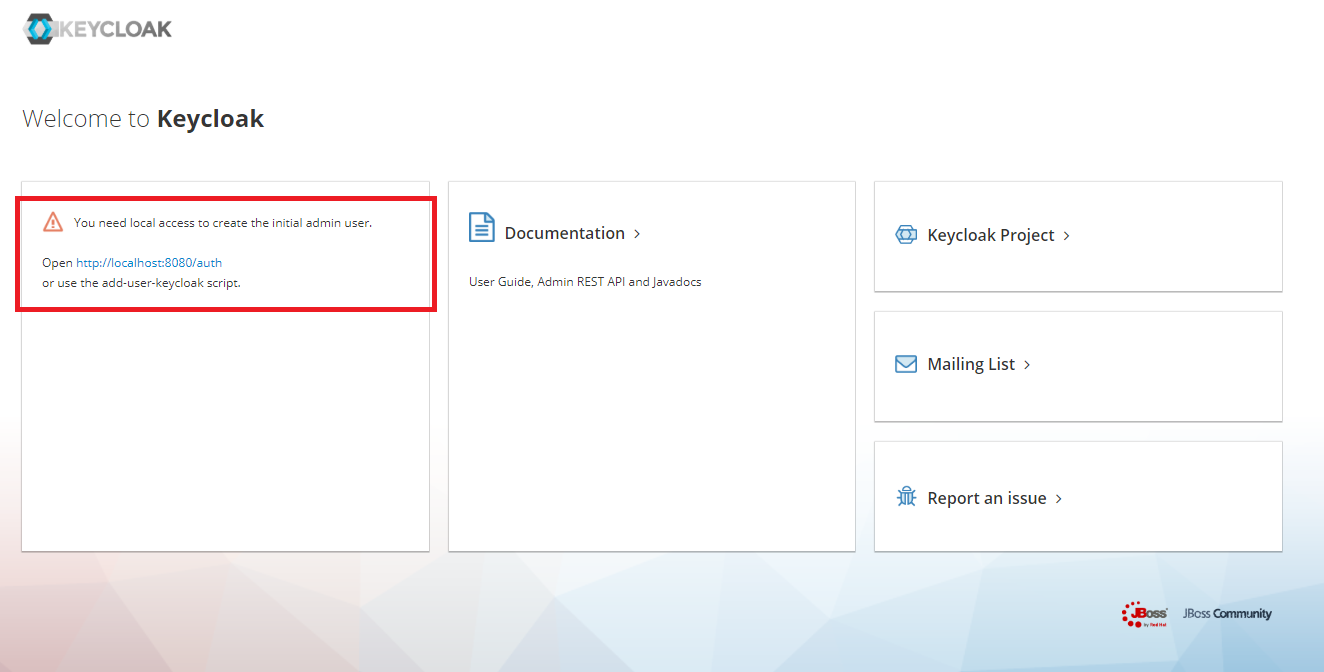
I tried to use the script add-user-keycloak but it changes nothing at all.
For information I create this swarm node on a NAS Synology with Docker 17.05
I don’t know how to debug more (I saw nothing on the logs).
Is it possible to have some help please?
Thank you,
Romain
Edit:
I go inside the container of keycloak and run a bash terminal.
When I echo KEYCLOAK_USER I see nothing (with the command echo $KEYCLOAK_USER)
I also display all the environment variable but no variables from the keycloak.env are presents.
Edit2:
I finaly have an answer: the Synology Docker version is quite old and contains some bugs and the creation/modify and read an environment files or ENV variables is not well supported.