Hi everyone,
I try to configure Keycloak like it’s describe in the tutorial.
I needed to change only the path of the scripts, environment files etc like you can see here:
version: '3'

services:
  keycloak:
    image: jboss/keycloak
    env_file: /path_to/var/config/keycloak/keycloak.env
    volumes:
      - /etc/localtime:/etc/localtime:ro
    networks:
      - traefik_public
      - internal
    deploy:
      labels:
        - traefik.frontend.rule=Host:keycloak.myhostname.local
        - traefik.port=8080
        - traefik.docker.network=traefik_public

  keycloak-db:
    env_file: /path_to/var/config/keycloak/keycloak.env
    image: postgres:10.1
    volumes:
      - /path_to/var/data/runtime/keycloak/database:/var/lib/postgresql/data
      - /etc/localtime:/etc/localtime:ro
    networks:
      - internal

  keycloak-db-backup:
    image: postgres:10.1
    env_file: /path_to/var/config/keycloak/keycloak-backup.env
    volumes:
      - /path_to/var/data/keycloak/database-dump:/dump
      - /etc/localtime:/etc/localtime:ro
    entrypoint: |
      bash -c 'bash -s <<EOF
      trap "break;exit" SIGHUP SIGINT SIGTERM
      sleep 2m
      while /bin/true; do
        pg_dump -Fc > /dump/dump_\`date +%d-%m-%Y"_"%H_%M_%S\`.psql
        (ls -t /dump/dump*.psql|head -n $$BACKUP_NUM_KEEP;ls /dump/dump*.psql)|sort|uniq -u|xargs rm -- {}
        sleep $$BACKUP_FREQUENCY
      done
      EOF'
    networks:
      - internal

networks:
  traefik_public:
    external: true
  internal:
    driver: overlay
    ipam:
      config:
        - subnet: 172.16.49.0/24
My keycloak.env is this:
# Technically, this could be auto-detected, but we prefer to be prescriptive
DB_VENDOR=postgres
DB_DATABASE=keycloak
DB_ADDR=keycloak-db
DB_USER=keycloak
DB_PASSWORD=mypassword
KEYCLOAK_USER=admin
KEYCLOAK_PASSWORD=myadminpassword

# This is required to run keycloak behind traefik
PROXY_ADDRESS_FORWARDING=true

# What's our hostname?
KEYCLOAK_HOSTNAME=keycloak.myhostname.local

# Tell Postgress what user/password to create
POSTGRES_USER=keycloak
POSTGRES_PASSWORD=mypassword
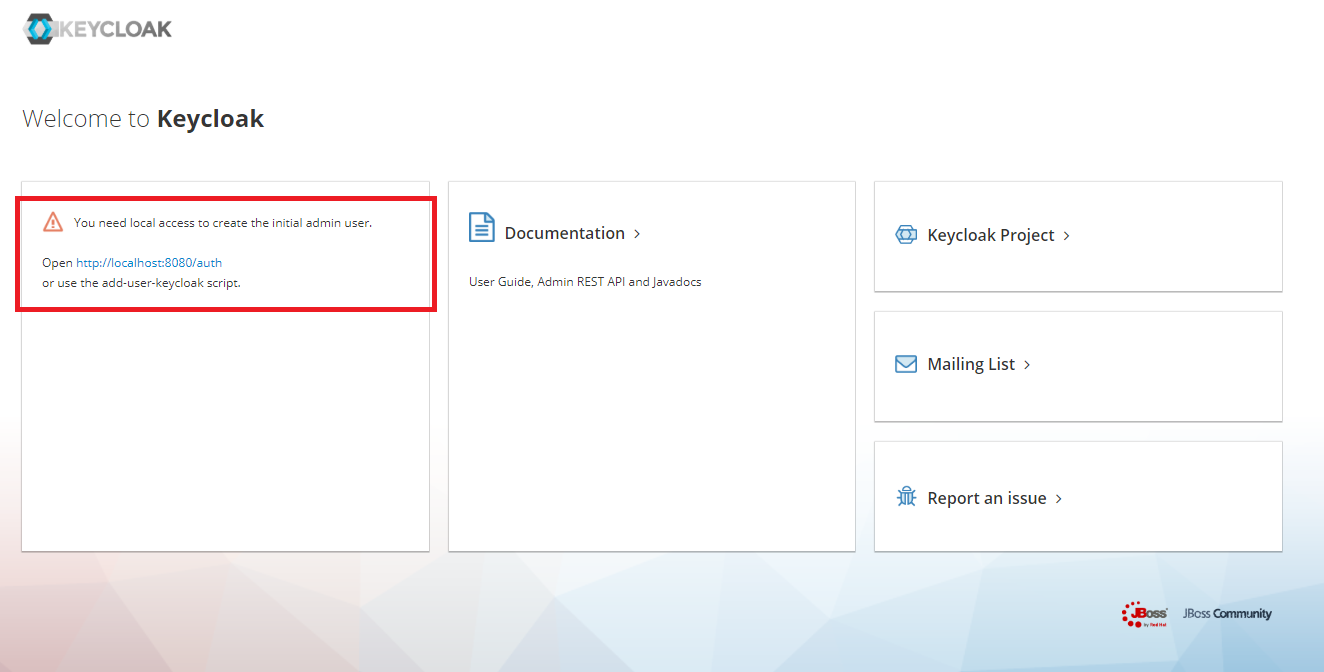
The service is launched without error but the admin user is not created like you can see in this screenshot:
I tried to use the script add-user-keycloak but it changes nothing at all.
For information I create this swarm node on a NAS Synology with Docker 17.05
I don’t know how to debug more (I saw nothing on the logs).
Is it possible to have some help please?
Thank you,
Romain
Edit:
I go inside the container of keycloak and run a bash terminal.
When I echo KEYCLOAK_USER I see nothing (with the command echo $KEYCLOAK_USER)
I also display all the environment variable but no variables from the keycloak.env are presents.
Edit2:
I finaly have an answer: the Synology Docker version is quite old and contains some bugs and the creation/modify and read an environment files or ENV variables is not well supported.